

Prices and Tax
How tax is stored on prices, how it flows through the cart and POS, and how to configure tax groups for VAT reporting.
Overview
Omnium supports two layers of tax configuration:
-
Rate-based tax. The simple model: every price carries an optional
TaxRate, and the cart applies that rate when calculating tax. If a price has no rate, the system falls back to the market's default. This is enough for tenants that only need to compute the right tax amount on order lines. -
Tax groups (Chart of Tax Groups). A richer model on top of the rate. Each product (or price) is tagged with a tax group code that references a tenant-managed chart. The chart entry carries the rate and an external code (SAF-T / MVA-kode / similar) used for VAT reporting and ERP posting. Use this when you need named VAT categories, country-specific reporting, or auditable links between order lines and your accounting system.
The two layers coexist. Tax groups are optional — enable them only when needed.
Tax Inclusion: Storing Prices With or Without Tax
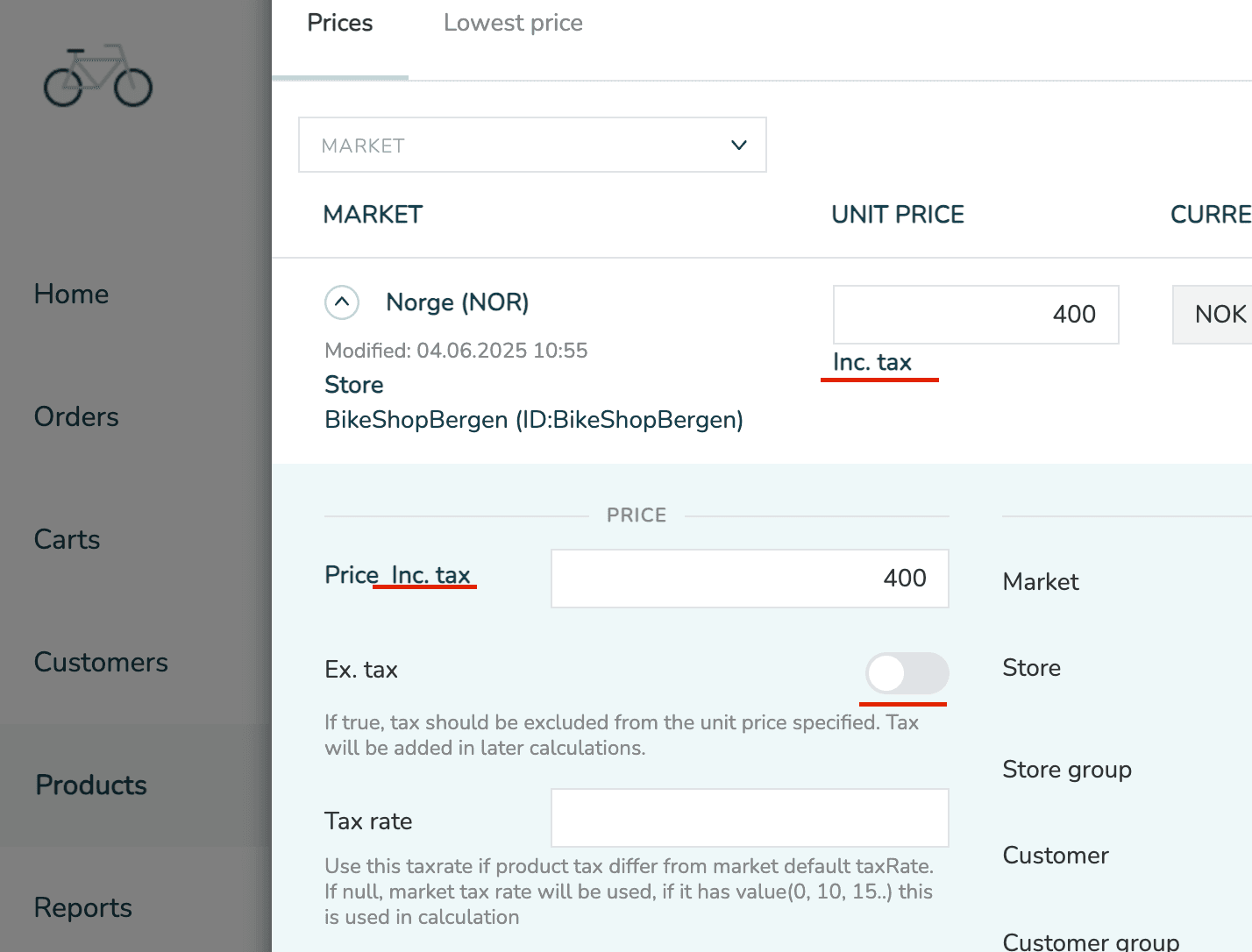
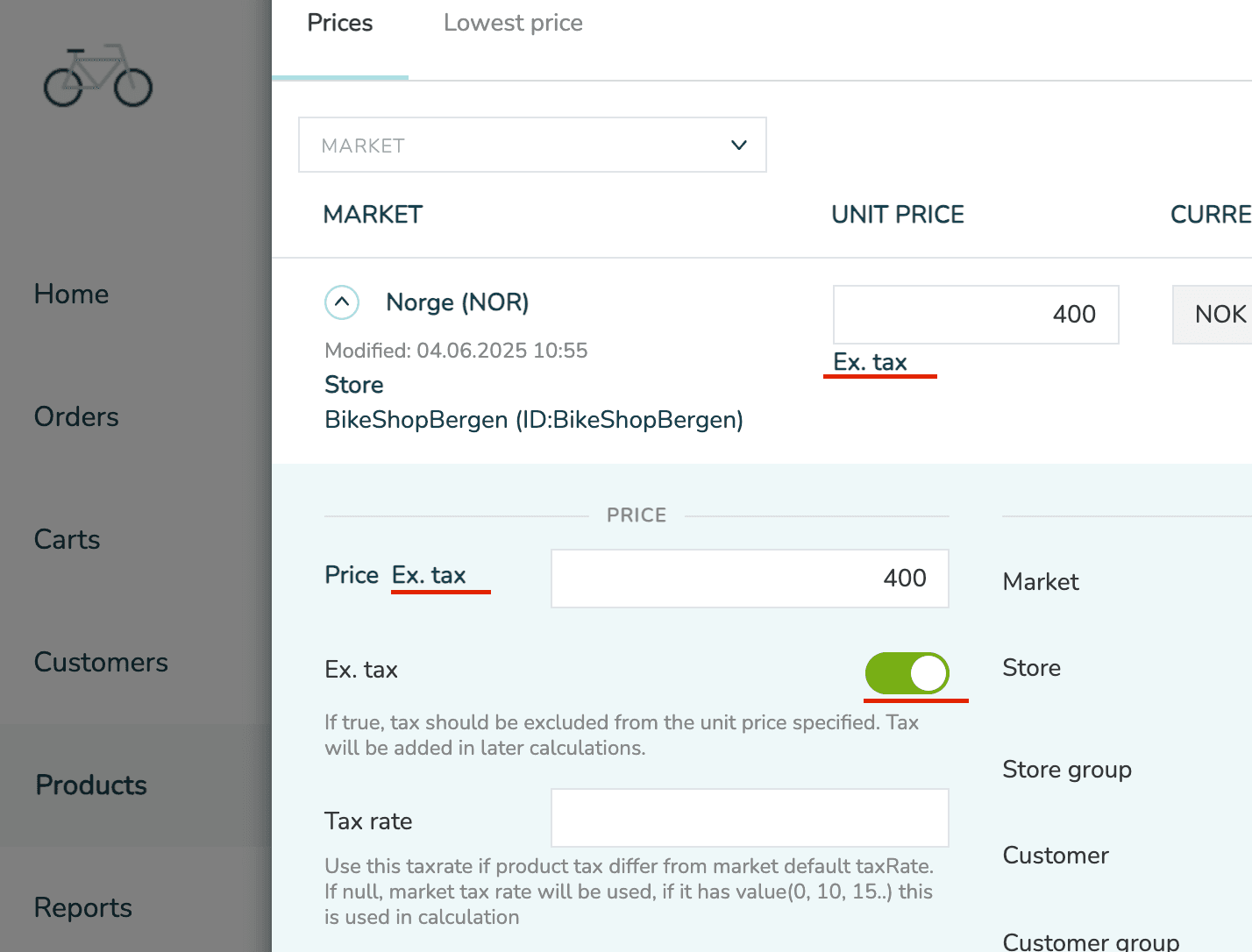
A price can be stored including or excluding tax. This is per-price, not tenant-wide.
| Setting | Level | Description |
|---|---|---|
Price.IsTaxExcluded | Price | When true, the stored UnitPrice is excluding tax. When false, UnitPrice is including tax. |
Market.IsTaxExcluded | Market | Controls whether tax is excluded from the cart total (typical for B2B). Does not act as a default for Price.IsTaxExcluded. |
| Unit price includes tax | Unit price excludes tax |
|---|---|
 |  |
Example:
Tax Rate Resolution
When a price is used (e.g. added to a cart), the effective tax rate is resolved in this order:
Price.TaxRate— explicit value on the price.Product.TaxRate— per-product fallback (see Setting Tax on Products).Market.DefaultTaxRate— the market's default rate.0— if none of the above is configured.
If tax groups are enabled, the chart can short-circuit this chain by resolving a rate from a group code instead. The resolution rules for that case are covered below.
Tax in the Cart
When prices are placed in a cart or order, tax behaviour depends on the market.
| Setting | Description |
|---|---|
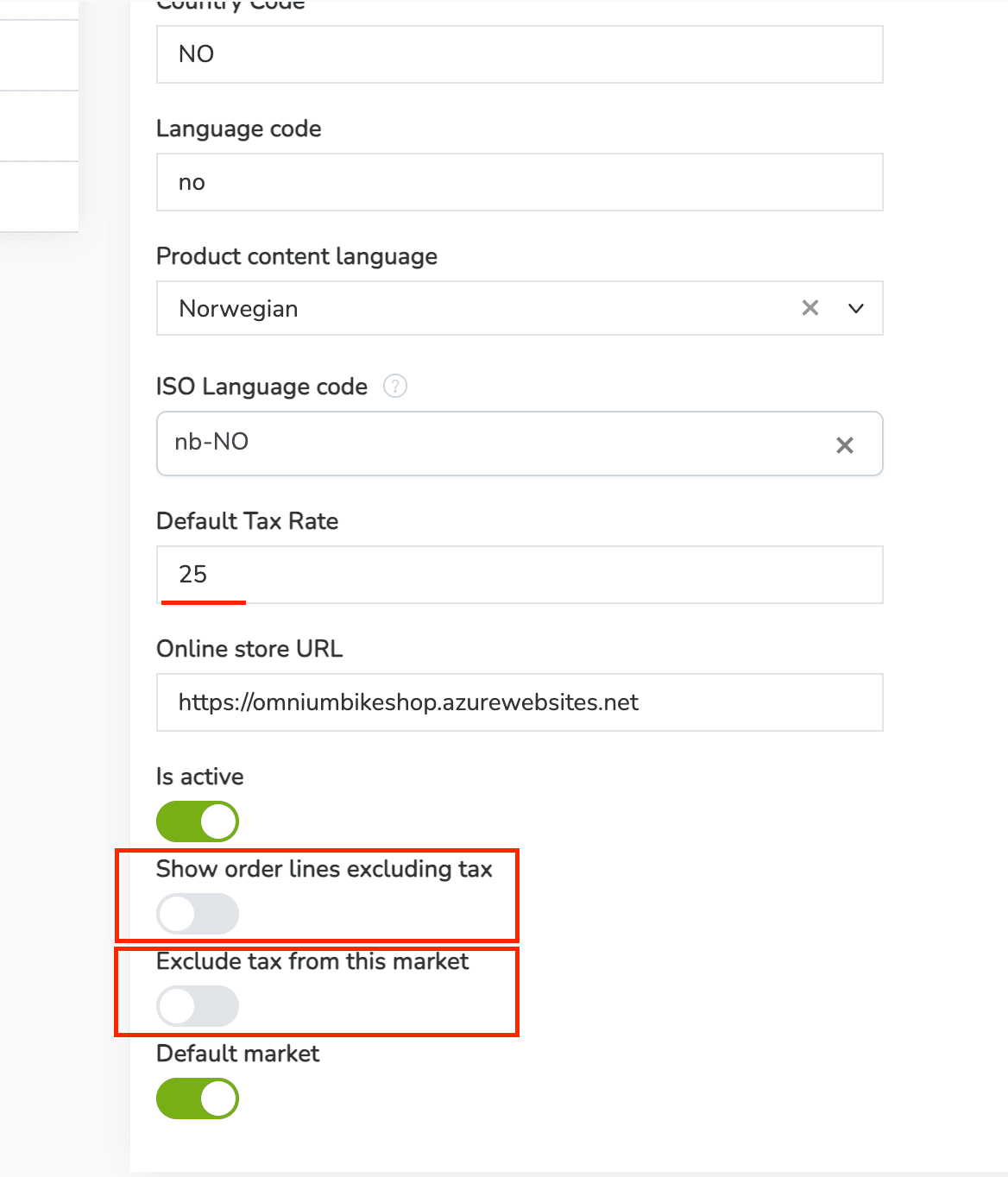
Market.IsTaxExcluded | When true, tax is excluded from the cart total (used for B2B). Order line TaxRate is set to 0. |
Market.ShowOrderLinesExTax | Controls whether order lines are displayed without tax. |
If Market.IsTaxExcluded = true, the cart total never includes tax — regardless of whether the underlying price included or excluded tax.
Examples
| Case | Price (UnitPrice = 10, TaxRate = 25) | Market | Cart Result |
|---|---|---|---|
| 1 | Price includes tax | Market includes tax | Cart price = 10, Tax = 2 |
| 2 | Price excludes tax | Market includes tax | Cart price = 12.5, Tax = 2.5 |
| 3 | Price includes tax | Market excludes tax | Cart price = 8, Tax = 0 |
| 4 | Price excludes tax | Market excludes tax | Cart price = 10, Tax = 0 |
Working with B2B Prices
In a Business-to-Business (B2B) context:
- Tax is usually excluded in the cart (
Market.IsTaxExcluded = true). - The underlying price definitions can still include or exclude tax (
Price.IsTaxExcluded).
This corresponds to Case 3 and Case 4 above.
Override the "Show Tax" Setting
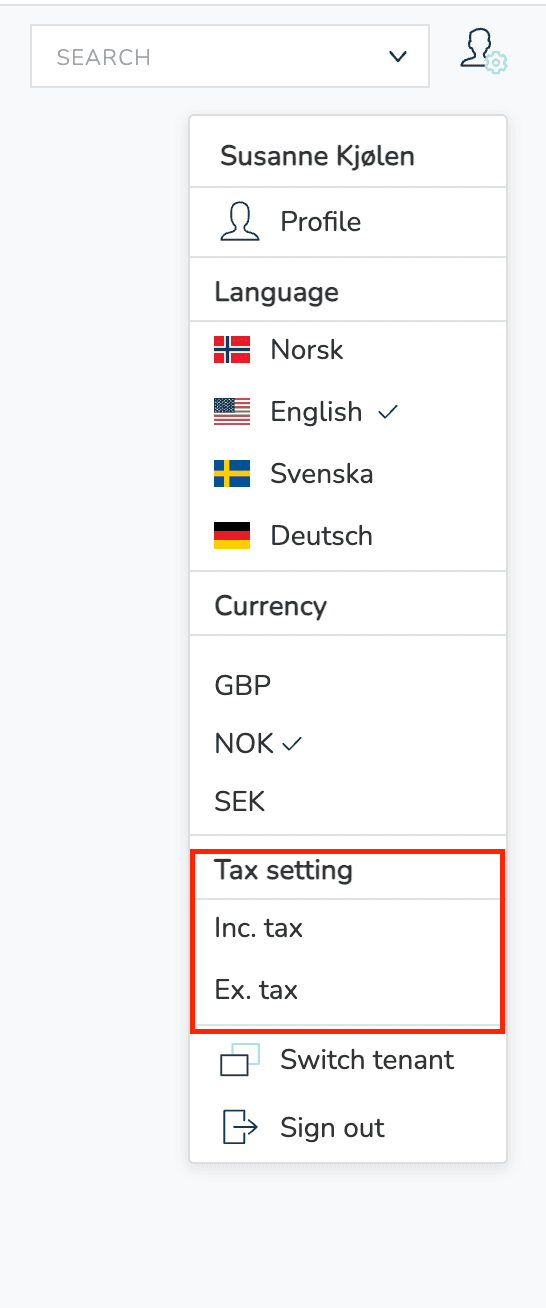
Market.ShowOrderLinesExTax controls whether order lines are shown without tax. This preference can be overridden per user profile, rather than only at the tenant level.
When a price is shown without tax, the label ex. mva appears next to the price.
This is configured in the tax settings section of the profile view:
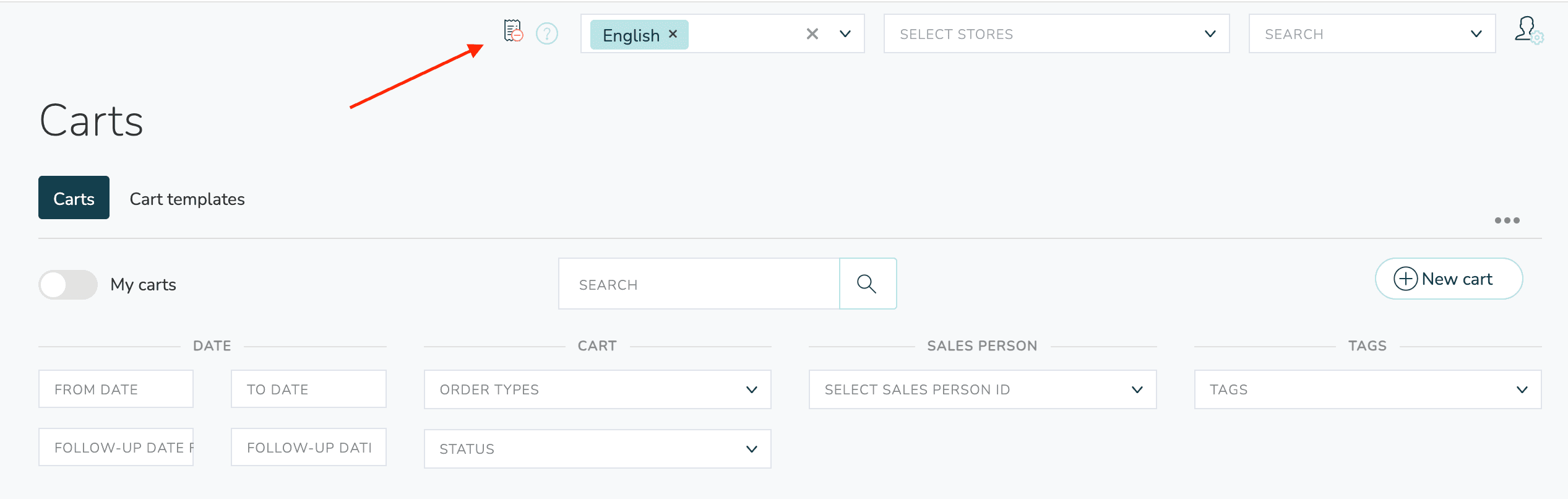
When a per-profile override is active, an icon appears at the top of the page:
Setting Tax on Products
A product can declare its own tax configuration so that prices pushed to it inherit it automatically. This is configured in the product editor under Settings → Tax.
Two fields are available:
| Field | When to use |
|---|---|
TaxGroupCode | Available when tax groups are enabled. Select a code from the tenant's chart. The chart entry's rate is applied automatically. |
TaxRate | A flat percentage (e.g. 25). Used as a fallback when no group is set, or when tax groups are disabled. |
Variants can override the parent product's tax fields. If a variant doesn't set its own value, the parent product's value applies.
Why Set Tax on the Product
When you push prices — either directly on the product or via a price list — you don't need to repeat the tax configuration on every price. If the incoming price omits both TaxRate and tax group, Omnium fills in the tax fields from:
- The product/variant's
TaxGroupCode(if tax groups are enabled and the code resolves). - The product/variant's
TaxRate. - The tenant's default tax group (if tax groups are enabled).
This means integrations can push price-only updates and let Omnium derive the correct tax category from the product master data.
The same fallback applies to price-list items: when patching a price list item without an explicit TaxRate, the system resolves the rate from the underlying product before saving.
Public API
Both fields are exposed on the public product API and can be read or patched from integrations. They are available on the product and on each variant (variant fields override the parent when set).
| Endpoint | Field | Notes |
|---|---|---|
GET /api/products/{id} | taxGroupCode, taxRate | Returned on the product and on each entry in variants[]. |
PATCH /api/products/{id} | taxGroupCode, taxRate | Omit a field to leave it unchanged. Send null (with fieldsToForceNull) to clear it. |
PATCH /api/products/PatchMany | taxGroupCode, taxRate | Same semantics, batched. |
Example — set a tax group on a product:
Example — set a flat tax rate on a variant:
When TaxGroupsEnabled = false on the tenant, taxGroupCode is accepted but has no effect at resolution time — only taxRate is used. See Tax Group Resolution for the precedence rules.
Tax Groups
Tax groups are a tenant-managed chart of named VAT categories. Each entry binds together a code, a name, a rate, and an external code used for accounting and government reporting.
A tenant with tax groups enabled gets:
- Named VAT categories (e.g.
HIGH,FOOD,EXPORT,OUTSIDE) instead of bare percentages on products and prices. - An external code per group, mapped to whatever taxonomy your ERP / fiscal authority uses (SAF-T
MVA-kodein Norway, Skatteverket codes in Sweden, etc.). - Effective-dating, so rate changes can be scheduled ahead.
- Automatic VAT summary aggregation by group on POS Z-reports.
Tax groups are opt-in per tenant. When disabled, the system behaves exactly as the rate-based model described above.
Enabling Tax Groups
Tax groups are configured under Configuration → Settings → Advanced → Accounting settings → MVA-satser.
| Setting | Description |
|---|---|
TaxGroupsEnabled | Master switch. When false, no tax group lookups occur and the tenant operates purely in rate-based mode. |
DefaultTaxGroupCode | The code applied to a product, price, or order line when no other code is set. Must reference an active entry in the chart. |
TaxGroups | The chart itself — a list of group entries. |
When you turn on TaxGroupsEnabled:
- The chart must contain at least one entry.
DefaultTaxGroupCodemust reference an entry whose validity window covers today.
If either condition fails, the tenant settings won't save.
Chart Entry Fields
| Field | Type | Description |
|---|---|---|
Code | string | Short stable identifier (e.g. HIGH, FOOD). Tenant-chosen. Required and unique across active entries. Referenced by products, prices, and order lines. |
Name | string | Human-readable name shown in the UI (e.g. Standard 25%, Næringsmidler 15%). |
Description | string | Optional longer description. |
Rate | decimal | The VAT rate as a percentage (25 for 25%, 11.11 for 11.11%, 0 for zero-rated). |
ExternalCode | string | The ERP / government tax code (Norwegian SAF-T MVA-kode such as 3 or 31, Swedish MP1/MP2/MP3, etc.). Free text — varies per ERP and country. Carried through to order lines and CSV settlement exports. |
IsOutsideVatScope | bool | When true, this group represents amounts outside the VAT scope (no VAT applies — e.g. statutory deposits). Reporting separates these from 0% zero-rated lines. |
ValidFrom / ValidTo | date | Optional validity window (day granularity). Used to schedule government rate changes. Null = unbounded. |
IsActive | bool | Soft-delete flag. Inactive entries are excluded from resolution. |
OverrideOutputVatAccountNumber | string | Optional GL account override for output VAT. Normally left blank — resolved via the Chart of Accounts. |
OverrideSalesAccountNumber | string | Optional GL account override for sales. Same semantics as above. |
The Code is what flows through the system on products, prices, and order lines. Keep codes short, uppercase, and stable across rate changes. When VAT rates change, add a new chart entry with the same Code and a new ValidFrom date — don't rename the code.
Country Presets
The editor includes pre-built starter charts for common European VAT setups. They're available as buttons in the chart editor when the chart is empty.
Norway — eight groups covering standard (25%), reduced (12%, 15%, 11.11%), zero-rated, export, outside-VAT-scope, and deposit (pant). External codes follow Norwegian SAF-T outgoing VAT codes (3, 31, 33, etc.).
Sweden — seven groups: standard (25%), reduced (12%, 6%), zero-rated, export, EU B2B, and outside VAT. External codes follow Swedish outgoing VAT identifiers (MP1, MP2, MP3, etc.).
Denmark — five groups: standard (25%), zero-rated, export, EU B2B, and outside VAT. Denmark has no reduced rates beyond zero. External codes are ERP-agnostic placeholders (U25, UEU, etc.) — adjust to match your ERP's tax codes.
After inserting a preset you can edit, deactivate, or extend entries as needed. The presets are starting points, not a fixed contract.
Always verify the ExternalCode for each entry against your ERP's actual chart of tax codes. Defaults follow common conventions but the exact codes vary per ERP and may also differ depending on your accounting practices.
Effective-Dating Rate Changes
When a government changes a VAT rate, you can schedule the change ahead of time:
- Set
ValidToon the existing entry to the day before the change (e.g.2026-12-31). - Add a new entry with the same
Codeand the new rate, withValidFromset to the day the new rate takes effect (e.g.2027-01-01).
The validity windows must not overlap for entries sharing a code. Tax group resolution always picks the entry whose window contains the relevant transaction date.
This means historic orders continue to report under the rate that was in force when they happened — important for VAT settlement and audit trail.
Tax Group Resolution
When a price is saved or an order line is added to a cart, the system resolves a single tax group through this chain:
- Explicit code on the price/line. If a
TaxGroupCodeis set and resolves to an active entry valid today, it wins — and the rate is taken from that entry. - Product code. If the product (or variant) has a
TaxGroupCodeand it resolves, both the code and the rate are stamped onto the price/line. - Product rate. If the product has only
TaxRate(no code), that rate is applied. The code is left empty so the line stays attributed to "no group". - Default group. Falls back to
DefaultTaxGroupCodefrom the chart. - Untouched. If the chart is misconfigured, the existing rate on the price/line is preserved.
When tax groups are disabled, only step 3 applies — the product's TaxRate fills in if the price has none.
The resolved rate is always written back to the price or order line, so downstream consumers see a concrete number, not a derived value.
Tax Groups on Order Lines
Order lines carry both the resolved TaxGroupCode and the snapshotted ExternalCode from the chart entry at the time the line was added.
| Field | Description |
|---|---|
TaxGroupCode | The group code applied to the line. |
TaxExternalCode | The chart entry's external code (SAF-T / MVA-kode), snapshotted so a later edit of the chart doesn't rewrite historic orders. |
TaxRate | The resolved rate. |
This snapshotting is intentional: reposting an old order produces the same external code even if the chart has since been edited.
Tax in POS Sales
POS transactions go through the same resolution chain, with one extra step for unlabelled rates.
When a transaction line arrives without a TaxGroupCode:
- Omnium searches the chart for an active entry whose rate matches the line's rate.
- If exactly one entry matches, the code and external code are stamped onto the line.
- If multiple entries match the same rate (e.g. several zero-rated groups), the line is left untagged rather than guessing.
- If no entry matches and the default group's rate matches the line's rate, the default is applied.
Lines that cannot be uniquely resolved surface in finance dashboards so the bookkeeping team can investigate.
VAT Summary on Z-Reports
When a Z-report is generated, sale and refund lines are aggregated into a VAT summary keyed by (TaxGroupCode, TaxRate) (or just TaxRate when tax groups are disabled).
Each summary entry contains:
| Field | Description |
|---|---|
VatRate | The rate as a percentage. |
TaxGroupCode | The group code (null when tax groups are disabled or the source lines were untagged). |
TaxExternalCode | The chart entry's external code, snapshotted from the source lines. |
TaxGroupName | The display name of the group at render time (e.g. Næringsmidler 15%). |
TaxableAmount | Sum of ex-tax amounts. |
VatAmount | Sum of VAT amounts. |
GrossAmount | Sum of inc-tax amounts. |
Sale and refund summaries are kept separate so accounting can post them independently.
Z-Report VAT Settlement CSV
For each Z-report, Omnium produces a settlement CSV intended for ERP import. The file is downloadable from the Z-report view (Admin role required).
The CSV uses semicolon-separated UTF-8 with BOM and includes both sale and refund directions. Header row:
| Column | Description |
|---|---|
Date | Report timestamp date, yyyy-MM-dd. |
Store | Store identifier. |
Register | Register / POS identifier. |
Direction | Sale or Refund. |
TaxGroupCode | Tenant chart code (empty when tax groups are disabled). |
ExternalCode | The chart entry's external code (SAF-T / MVA-kode etc.). |
Rate | VAT rate. |
TaxableAmount | Ex-tax amount. |
VatAmount | VAT amount. |
GrossAmount | Inc-tax amount. |
ERPs can map ExternalCode directly to their own VAT-code chart to post the settlement.
Quick Reference: Where Tax Lives
| Location | Field(s) | Notes |
|---|---|---|
| Market | IsTaxExcluded, DefaultTaxRate, ShowOrderLinesExTax | Market-level defaults and B2B handling. |
| Tenant accounting settings | TaxGroupsEnabled, DefaultTaxGroupCode, TaxGroups[] | The chart itself. |
| Product | TaxGroupCode, TaxRate | Per-product defaults. Variants can override. |
| Price | TaxGroupCode, TaxRate, IsTaxExcluded | Per-price overrides. Inherits from product when missing. |
| Price list item | TaxRate | Inherits from product when missing — applied when items are saved. |
| Order line | TaxGroupCode, TaxExternalCode, TaxRate | Resolved and snapshotted at cart-add time. |
| POS transaction line | TaxGroupCode, TaxExternalCode, TaxRate | Resolved on validate-and-compute. |
| POS Z-report VAT summary | One row per (TaxGroupCode, TaxRate), per direction | Sale and refund summaries kept separate. |